Articles
Rent a car with Turbi: Learn the step-by-step process.
Learn the steps to rent a car with Turbi and start driving while paying a fair and affordable price to get around.
Advertisement
How to rent a car with Turbi
THE Turbi Turbi is a car rental startup offering fair prices and functionality. The service is currently available in Greater São Paulo and surrounding cities, but plans to expand to capitals and major urban centers later this year. Operating entirely online, today we'll show you that renting a car with Turbi is a simple, fast, and extremely practical process.

If you don't own a car, enjoy saving money, love driving, and are interested in the services offered by the startup, it's time to learn how to rent a vehicle for leisure or work. Let's go?
You will be redirected to another website
Step-by-step guide to renting a car with Turbi
Check out this tutorial created by the experts at Senhor Carros on how to rent a vehicle with Turbi and drive around safely and at fair prices.
Start by downloading the app.
The first step to renting a car with Turbi is to download the mobile app. It's important to mention that, as you might expect, the app is available for both Android and iOS smartphones.
If your smartphone is Android, just click the button below.

Once you've downloaded the app, ideally you should allow it access to your location, since the app will use your location to show you the nearest Turbi parking lot.
If your smartphone has an iOS system, simply click the button below.
Create an account
The second step is to create an account. To do this, you need to open the app and click on "Log in".
You can create an account using your Facebook or Google credentials. If you want to register with an email address, simply use the option indicated at the bottom of the screen that will appear.
Register now
The third step to renting a car with Turbi is to register. There are some prerequisites for completing this registration. To register, you will need:
- Be 21 years of age or older;
- Original driver's license in hand (category B, more than 2 years old);
- Take a selfie;
- Having your own credit card;
- Enter your details.
After all that, simply click next and continue with your registration.
Address and face on display
In the fourth step, you will add your contact information, such as your cell phone number, landline number (if you have one), and the postal code where you live.
Next, you will need to enter your full address and type the confirmation code sent via SMS message to the mobile phone number you previously provided.

After entering the code, it's time to review all your information. If everything is correct, simply confirm and click to proceed with a selfie.
Registration approved
The fifth step is the approval of the registration.
After taking the selfie, it's time to accept the terms and click continue to register your signature, which must be identical to the one on your driver's license.
Once this is done, your registration will be reviewed. Shortly after, you will receive an email notification regarding the approval of your registration and any possible pending issues.
Time to rent a car with Turbi.
After completing your registration and being approved, it's time to rent a car. with TurbiTo do this, you need to use the search field to search for or select a car on the map.
Simply swipe the card at the bottom of the screen to the left to select a travel option. Check the box on the left and tap start booking.
Once that's done, you'll be directed to a screen to register your credit card. Click continue and enter your card details.
After entering your card details, simply return to the map and select your desired car and travel option.
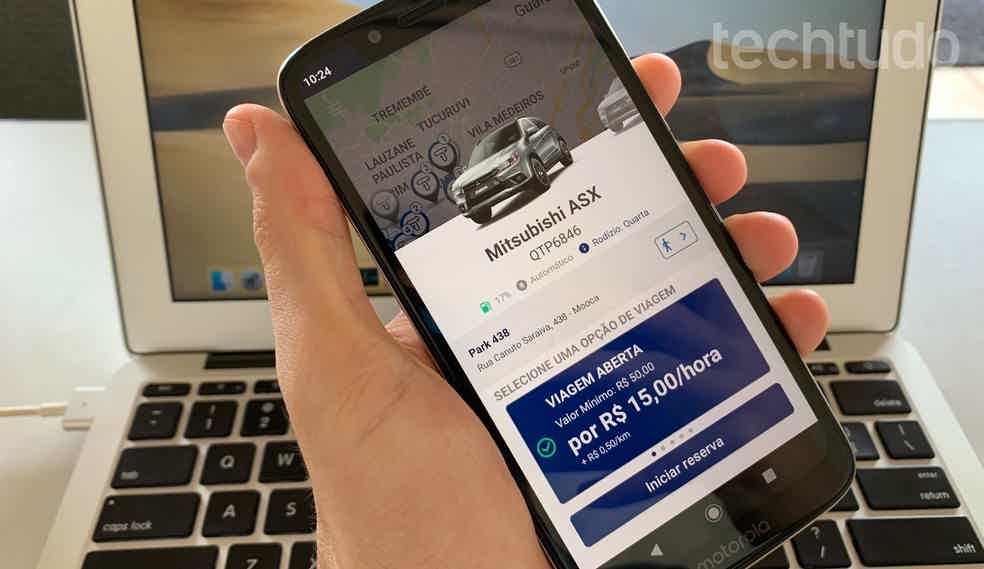
The app will inform you that it will pre-authorize a certain amount and return the difference when you return the car. Simply click "next" to proceed with the reservation.
Once the reservation is confirmed, the app will notify you that you have up to 30 minutes to reach your reserved vehicle.
If you cancel your reservation before picking up the vehicle, you will be charged R$ 20. To complete the reservation process, simply tap "I agree to the terms".
After that, simply head to your reserved vehicle and enjoy your rental.
Arriving at the car and getting out to drive
After making your reservation, simply go to your car. To open the door of your reserved vehicle, simply unlock it using the app. The keys will be in the glove compartment.
After use, simply return the vehicle to the same parking lot where you picked it up. Remember to return the key to the glove compartment. Payment is made through the app upon returning the car.

Once the payment is approved, the security deposit requested at the time of booking is automatically cancelled.
As you can easily see, renting a car with Turbi is simple, fast, practical, and economical. To book your rental right now, just click the button below.
Trending Topics

Review of the Autopia app: buying and selling cars!
Check out the Autopia app review and understand how it uses car leasing, making it easier to buy a car for those who don't have the money upfront.
Keep Reading
Cheap motorcycle for delivery: how to choose the best one to buy at auction?
Looking to earn extra income with deliveries, but don't know which motorcycle to buy? Read on to find out which is the best and cheapest motorcycle for delivery!
Keep Reading
Find out which were the 10 best-selling Fiat cars in 2020.
Present in Brazil for over 50 years, the Italian automaker is one of Brazilians' favorites. Find out which were the 10 best-selling Fiat cars in 2020.
Keep ReadingYou may also like

Pros and cons of the Fiat Cronos: What it's like to have one in your garage.
Mr. Cars | The best articles about cars on the internet! Pros and cons of the Fiat Cronos: What it's like to have one in your garage.
Keep Reading
Coronavirus: How to sanitize your car during the pandemic.
With coronavirus cases rising in Brazil and other countries, some precautions are necessary. Learn how to sanitize your car during the pandemic!
Keep Reading
Lightyear One: Meet the solar-powered car
Mr. Cars | The best articles about cars on the internet! Lightyear One: Meet the solar-powered car
Keep Reading


